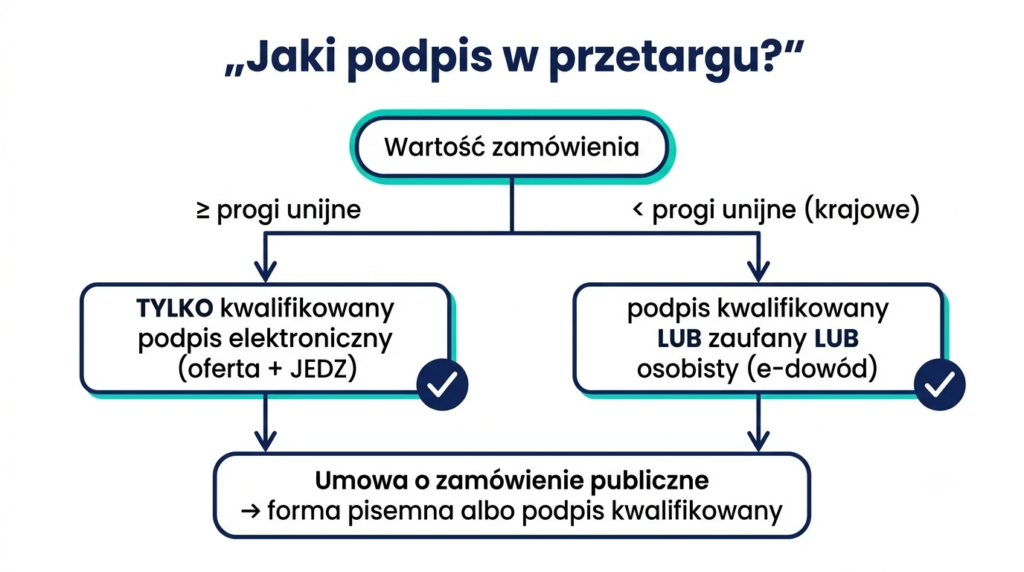
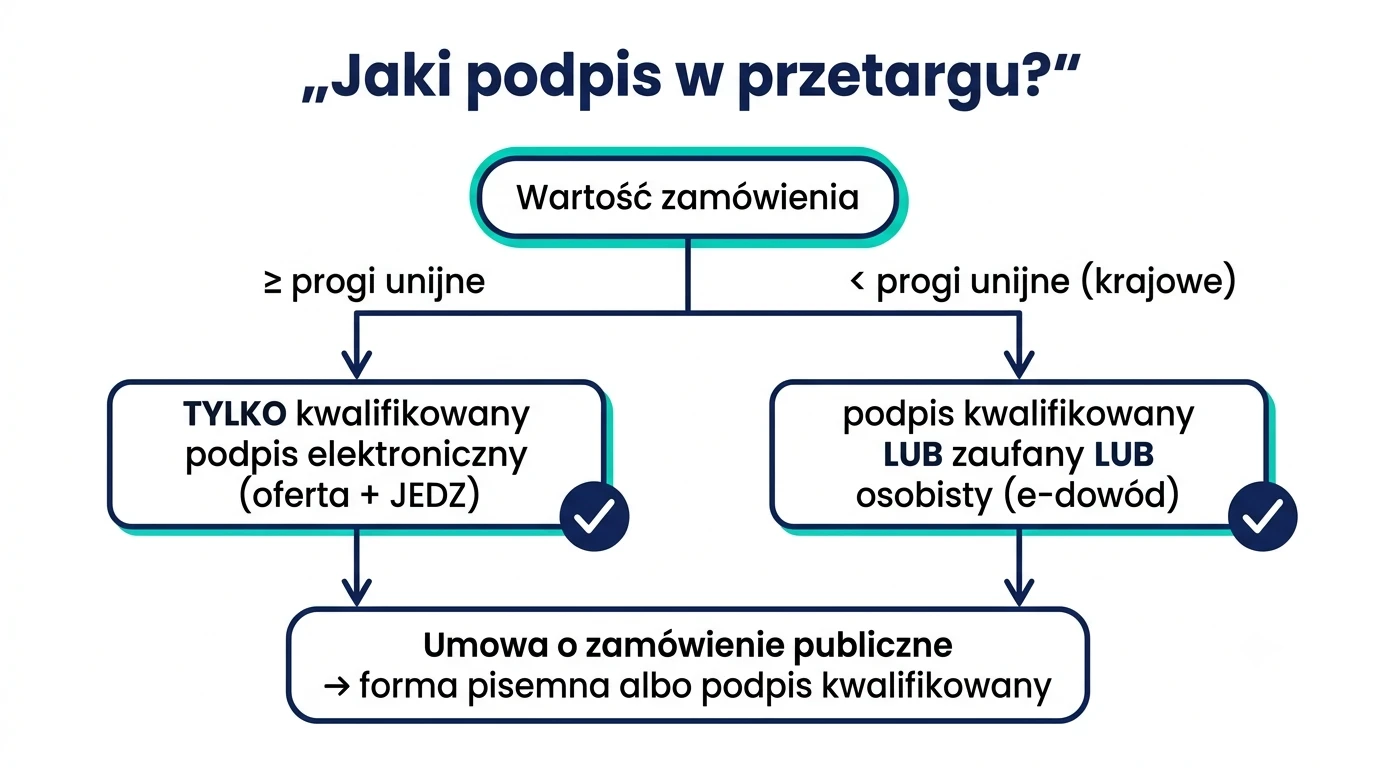
In proceedings with a value equal to or greater than the EU thresholds, you must sign the bid and the ESPD exclusively with a qualified electronic signature. In national procurement procedures (below the thresholds), the law also permits a trusted signature and a personal signature, but it is the qualified signature that is valid in both cases—and it is the only one that also allows the public procurement contract itself to be concluded electronically. We explain the reasoning behind each step and how to avoid losing an offer due to a procedural error.
Why does the type of signature determine the validity of an offer?
The Public Procurement Law (Act of September 11, 2019, hereinafter: PZP) has moved communication between the contracting authority and contractors online. Bids are submitted via the platform e-Orders or the buyers’ shopping portals, and a document without the proper signature is treated as if it had not been submitted. In practice, this means Rejection of the offer without the possibility of amending it (Article 226(1)(3) of the Public Procurement Law) — regardless of how good the price was.
EU thresholds determine: Which signature is required for which procedure?
The rule is simple:
- Procurement procedures with a value equal to or exceeding the EU thresholds (Article 63(1) of the Public Procurement Law) — the bid, the Single European Document (SED), and the statements shall be signed only with a qualified electronic signature (QES).
- National proceedings, below EU thresholds (Article 63(2) of the Public Procurement Law) — a qualified digital signature is permitted, trusted signature or personal signature from the e-ID.
The current EU thresholds are announced by the President of the Public Procurement Office in a notice updated every two years. For the years 2026–2027, they are: 140,000 euros (supplies and services for central government), 216,000 euros (including local governments), and 5,404,000 euros (construction works); as of January 1, 2026, the Act itself applies to contracts with a value of at least 170,000 PLN net. Before submitting a bid, always check the value of the procurement in the notice or the tender documentation.
| Document | Performance ≥ EU thresholds | National Proceedings |
|---|---|---|
| Offer | only a qualified digital signature | qualified / trusted / personal |
| EAT (ESPD) | only a qualified digital signature | Not applicable (statement under Article 125 of the Public Procurement Law — same as a bid) |
| Power of Attorney | the principal's qualified digital signature | such as an offer (or a notarial certification) |
| Procurement Contract | only a qualified digital signature (or a paper signature) | only a qualified digital signature (or a paper signature) |
What is a JEDZ, and how do you sign it correctly?
ESPD (European Single Procurement Document) This is a self-declaration by the contractor, which, in procurement procedures exceeding EU thresholds, replaces certificates and attestations during the bidding phase. It is submitted electronically—most often as an XML or PDF file generated on the eESPD platform—and appends a qualified electronic signature.
Practical tip: Sign PDF files in the PAdES (a signature „inside” the document), and XML files — in the format XAdES. If you are using XAdES in the external mode, be sure to provide the ordering party with both files: the document and the signature file. You can read more about the differences in the article PAdES and XAdES — Two Forms of Digital Signatures.
How to Sign a Bid on the e-Zamówienia Platform: A Step-by-Step Guide
- Prepare a set of documents — the offer, JEDZ/statements, powers of attorney, and the relevant evidence.
- Sign each file with a qualified digital signature — in the app SimplySign or proCertum SmartSign; PDF as PAdES, XML as XAdES.
- Verify the signatures before sending — Check the validity of the signature, before you click „Submit Offer.” Once the submission deadline has passed, you won’t be able to make any changes.
- Submit your offer in the „Offers/Applications” tab” and download both confirmations: the Electronic Transmission Confirmation (EPP) and the Electronic Receipt Confirmation (EPO).
The most common mistake? Editing a document after signing it — this invalidates the signature. The order is always: final version → signature → shipment. A signature applied to a ZIP file covers all files in the archive (§ 8 of the Regulation on Technical Requirements), but it is safer to sign each file separately.
What about the contract? Written form or a qualified digital signature
Pursuant to Article 432 of the Public Procurement Law, a public procurement contract requires in writing, under penalty of nullity. In the digital world, its equivalent is exclusively an electronic form bearing a qualified electronic signature from both parties (Article 78¹ of the Civil Code). An increasing number of contracting authorities—including schools, preschools, and local government entities—are signing contracts in precisely this manner: without printing, couriers, or scanning. This also applies to addenda and minutes that require written form.
Powers of Attorney and Consortia — Who Actually Signs the Bid?
In public procurement practice, it is rarely a „company” that signs—it is a specific individual who signs, and the contracting authority meticulously verifies that person’s authority. Three typical scenarios:
- A one-person delegation — The owner of JDG or the company’s CEO signs with a qualified digital signature; the contracting authority verifies the authority in CEIDG/KRS.
- Authorized representative (e.g., a bidding specialist) — A power of attorney is required. In proceedings exceeding EU thresholds, the power of attorney must be submitted in electronic form bearing the principal’s qualified digital signature (or as an electronic copy certified by a notary). A scan of a paper power of attorney without certification is one of the most common reasons for requests to provide additional information.
- Consortium — Contractors jointly bidding for a contract shall appoint a representative (lead contractor); the bid is signed by the lead contractor, but the statements required under Article 125 of the Public Procurement Law (including the ESPD) must be signed by each consortium member own a qualified digital signature. This means that every company in the consortium must have a certificate—it’s a good idea to check this a week before the deadline, rather than on the day of submission.
Best practice for bidding departments: Keep a record of the validity of all signers’ certificates. A certificate that expires during the process (e.g., between the bid submission and the signing of the contract) can bring the entire process to a halt—renewal takes only a moment, but only if someone remembers to do it.
What else will you sign during the proceedings?
A qualified digital signature is useful not only for the bid itself. In a typical procedure, the following are also signed electronically: explanations of the bid’s content and any abnormally low price, evidence submitted by the bidder, and updated statements; commitments by third parties to make resources available; a bid bond submitted in the form of an electronic guarantee (here, the signature is provided by the guarantor—a bank or insurer), and finally, the contract and its annexes. The further into the process one goes, the more often it turns out that a single „company” certificate is not enough—explanations with a two-day deadline cannot wait until the CEO returns from a business trip. That is why well-established bidding departments equip at least two people with mobile signature capabilities.
Which signature should I choose for tenders: SimplySign or Certum Mini?
Both signatures offered by podpisano.pl, an authorized partner of Certum, are eligible and fully accepted on e-Zamówienia and other procurement portals:
- SimplySign — Mobile, cloud-based, no card reader required. Perfect when multiple people in different locations are submitting offers, or when you’re signing documents „at the last minute” from your phone.
- Certum Mini — Signature on a card using a card reader, with a set of timestamps. This works well for a stationary quoting department.
Are you on the fence? Read the comparison SimplySign or Certum Mini or just give us a call: +48 22 417 05 55. We'll help you with your purchase, installation i We will train the proposal team.
Key Points at a Glance
- Above the EU thresholds: only a qualified digital signature — to the proposal, the JEDZ, and the statements.
- Below the thresholds: a trusted or personal signature is also acceptable, but a qualified signature works everywhere.
- Electronic public procurement contract = only a qualified digital signature.
- Sign the final files (PAdES/XAdES), verify them before sending, and do not edit them after signing.
FAQ — Frequently Asked Questions
What kind of signature should I use to sign a bid in a tender on the e-Zamówienia platform?
In procurement procedures with a value equal to or greater than the EU thresholds—only a qualified electronic signature is permitted. In national procurement procedures below the thresholds, a trusted signature or a personal signature from an e-ID card is also acceptable.
Does a JEDZ need to be signed with a qualified digital signature?
Yes. The ESPD must be submitted in electronic form with a qualified electronic signature—this applies to procurement procedures above the EU thresholds in which the ESPD is required.
What kind of signature should be used to sign a public procurement contract?
The agreement must be in writing to be valid; therefore, it can be concluded electronically only if both parties provide a qualified electronic signature. A traditional signature on paper remains an alternative.
Is a trusted profile sufficient for a tender?
Only in domestic procurement procedures, below the EU thresholds. In EU tenders, a bid signed with a trusted profile will be rejected.
In which format should bid files be signed—PAdES or XAdES?
PDF files should preferably be signed using the PAdES format, and XML files (e.g., JEDZ) using the XAdES format. When using an external XAdES signature, provide the contracting authority with the document along with the signature file.
Qualified signatures SimplySign and Certum Mini
If you have any concerns or questions, please contact us
We'll answer your questions, find a time that works for you, and match you with an advisor at one of our offices—in Warsaw, Kraków, Wrocław, or Radom—or schedule an online meeting.
You can also send us an email [email protected].