Archiving documents with e-signature - an offline guide for companies

Offline archiving is not just a backup. It's a concrete legal strategy that secures electronically signed documents - for years to come.
Archiving documents with e-signature - an offline guide for companies

How to take care of the long-term validity of a qualified signature? Offline archiving step by step

Qualified Signature (QES) is the most powerful e-signature in Europe. It has the same legal force as a handwritten signature and works in all EU countries. Sound perfect?

There is only one "but": the signature in itself does not guarantee legal permanence forever.

Why? Because its technical validity expires.

Why isn't the signature alone enough?

The certificate by which the signature is made expires (usually after 1, 2 or 3 years). The CRL (Certificate Revocation List - i.e. the list of revoked certificates) is also no longer updated when the certificate expires. After several years, it is impossible to verify that the signature was valid when it was submitted.

The result? In the event of an audit, a court case or an audit, a document signed several years ago can be challenged.

Which solution? Timestamp

This is where a qualified timestamp comes into play. It's a type of digital stamp that confirms that a document existed at a specific point in time and hasn't been altered since.

It's crucial to prove years later that the signature was valid at the time of submission - even if the certificate has expired.

Best practice

Offline archiving vs. electronic signature

Offline archiving is the process of securing and storing electronic documents outside the online environment - that is, without a permanent Internet connection or without using cloud services. It can apply to both ordinary files and documents signed electronically (e.g., with a qualified signature).

What does "offline" mean in the context of archiving?

"Offline" doesn't just mean no Internet. In practice, it is:

  • storing data locally - on physical media, such as hard drives, DVDs, flash drives, offline servers,
  • No automatic synchronization with cloud services (e.g., Google Drive, Dropbox),
  • often cut off from the network for security purposes - to minimize the risk of cyber attacks or data leaks.

What does "offline archiving" mean in the context of qualified signatures?

In the context of qualified signatures, offline archiving is particularly important because:

  • the signed document can be be retained on a local medium (e.g., invoice, contract, report),
  • you do not need to be connected to the Internetto sign a document - if you use, for example, Certum Mini with the application proCertum SmartSign,
  • timestamp (i.e. digital confirmation of the moment of signature) can be added later, when Internet access is available.

When is offline archiving used?

  • In institutions and companies with high security requirements (e.g., administration, financial sector),
  • In long-term archives,
  • in internal procedures that do not allow data storage in the cloud,
  • When creating backups to be resistant to ransomware attacks.

How to build an offline archiving procedure?

You don't need a complex DMS (Document Management System - an electronic document management system). All you need are a few simple steps.

Step 1: Sign the document

  • Certum Mini (with proCertum SmartSign).: signature on your computer (PDF, XML, etc.).
  • SimplySign: online signature (desktop + mobile)

Step 2: Add a timestamp

  • Certum Mini: you can sign the document offline, and add the tag later, after you have access to the Internet - the order of the procedure later in the article
  • SimplySign: signature always online, tag added automatically or as an additional signature

Step 3: Archive locally

  • PDF format with PAdES signature best suited for archiving
  • If you archive documents with an external signature - don't forget to include the signature file
  • Describe the files with metadata (signature, date, document type)
  • Create backups (e.g., on a separate drive)

Step 4: Document the procedure

  • Who signs?
  • What documents does the procedure include?
  • What tools are used?
  • Where and how are the files stored?

Certum Mini or SimplySign?

Both tools are compatible with eIDAS, but have a different approach to work.


Feature

Certum Mini

SimplySign

Requires reader and card

Yes

Not

Works offline

Yes

Not

Adding a time stamp after the signature (as a new signature or countersignature)

Yes

Yes

Can a document be signed without a tag

Yes

Yes

Ideal for

Offices, archives

Mobile users


If you want independence from the Internet and archiving on your own terms, Certum Mini would be a better choice.

Can a timestamp be added at a later date after signing?

Well, the timestamp itself cannot be added to an already signed document - but as is usually the case, there are other solutions to update a document signed with a qualified signature without a timestamp. 

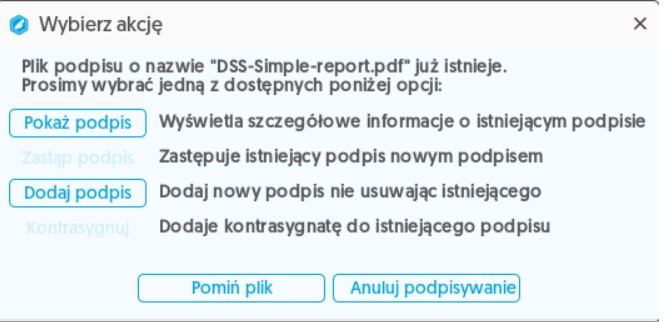
How to add a time stamp after the document has already been signed? (proCertum SmartSign)

  1. You sign an offline document (e.g. PDF) in SmartSign using Certum Mini
  2. Once you have access to the Internet:
    • Open SmartSign
    • Select a document
    • Add another signature with timestamp option enabled (for internal signature)
    • Or: replace the existing signature with a new one with a tag / add a countersignature (for external signature)

Why does it work? Because the signature and timestamp are two separate operations. The signature can be offline, while the timestamp requires a connection to the server.

Remember
  • In the case of a signature internal you can only add another signature containing a timestamp (as long as you enable timestamping in the options).
Archiving documents with e-signature - an offline guide for companies
  • In the case of a signature external you can replace an existing signature with one with a timestamp (as long as you enable the timestamp in the options), add a countersignature, or add another signature with a timestamp.
Can a timestamp be added at a later date after signing?

A qualified signature is the foundation of document credibility.

But its durability is up to you.

Signature + timestamp + local archiving = secure document for years.


Call us at

and we will put you in touch with one of our representatives available virtually nationwide.

Check also:

Do you need help?

Find what you're looking for